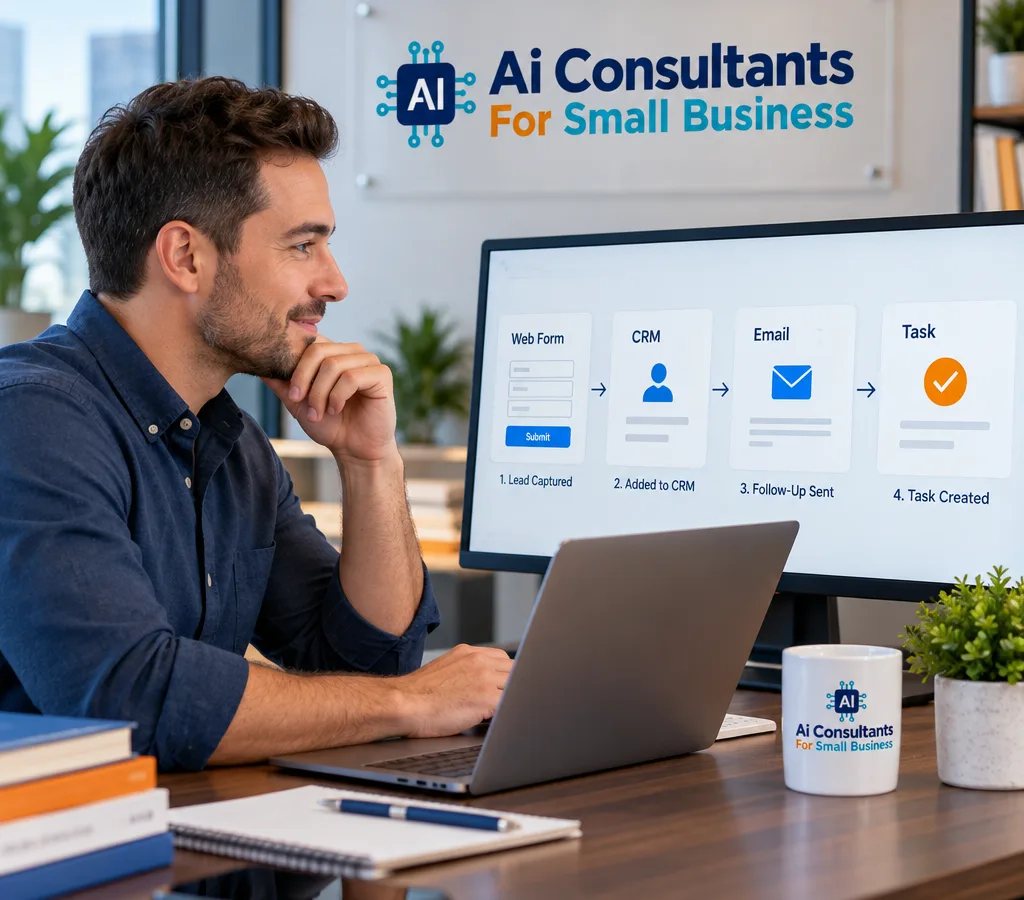
Lead capture + instant follow-up
When a lead comes in (form, email, social, or text), the system replies right away, asks the next best question, and routes the lead to the right inbox or pipeline stage.
AI automation service · United States
Automate follow-ups, booking, invoices, and customer replies without replacing your current tools. We map your workflow, set up the automations, and keep the handoff to a real person when it matters.
Practical automation
AI automation for small business usually means a few practical workflows that run reliably in the background: capturing leads, replying quickly, booking appointments, sending reminders, collecting payments, and routing issues to a human when needed. The goal is simple: reduce the time you spend on repetitive admin while keeping your customer experience consistent.
It does not mean turning your business into a chatbot-only operation. Most small businesses need a blended system: AI drafts and routes messages, a human approves edge cases, and the system logs everything so you can see what happened later. Done well, automation makes you faster to respond and harder to drop the ball, even when you are busy on the floor, on the road, or with a client.
Ai Consultants For Small Business focuses on automations that fit how you already work. We start with the work you want to stop doing, then design a setup that uses clear rules, a safe fallback, and reporting you can actually read.
Automation capabilities
When a lead comes in (form, email, social, or text), the system replies right away, asks the next best question, and routes the lead to the right inbox or pipeline stage.
Automated scheduling with confirmations, reschedules, and reminder sequences that reduce no-shows and keep your calendar accurate across devices.
Generate and send invoices based on triggers (job complete, milestone reached), with polite follow-ups for unpaid invoices and receipts stored in your system of record.
AI can categorize requests (billing, schedule change, issue report), pull the right template, and escalate urgent items to a human with the context attached.
After a completed job or purchase, the system sends a review request at the right time and routes negative feedback privately so you can resolve it.
When something changes (new booking, failed payment, VIP request), your team gets a clear alert and the right task appears in the tool you already use.
Operational outcomes
Most of the time savings come from two places: reducing back-and-forth and preventing missed handoffs.
We look for moments where customers are waiting on you for a basic next step. Examples include: confirming availability, collecting a few details before a quote, sending the address and arrival window, or answering a common question like cancellation policy. These are high-volume interactions with low risk, as long as the automation stays on script and hands off when the conversation turns specific.
We also focus on the handoff points that cause revenue leaks: a lead that never gets a reply, an estimate that never gets followed up, an appointment that never gets confirmed, an invoice that never gets nudged, or a support issue that disappears in someone's inbox.
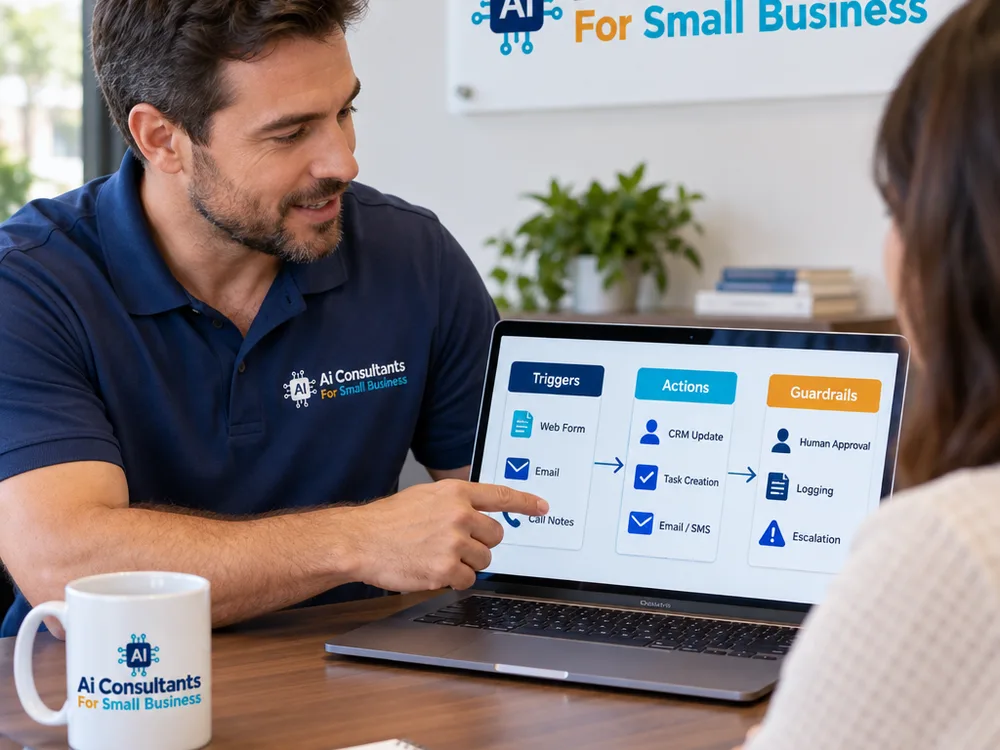
A good automation includes guardrails:
If you are comparing providers, start with teams that can explain those guardrails in plain terms. You can also get a sense of our broader approach on the home overview for AI consulting services for small business.
From assessment to launch
We identify the repetitive steps, your current tools, and where leads or requests get stuck. We also define what must stay human-led (exceptions, sensitive issues, approvals).
We map triggers, messages, routing rules, and escalation paths. You review the wording and tone so the automation sounds like your business, not a generic script.
We integrate the tools you already rely on (calendar, CRM, email, forms, payment/invoicing). When direct integrations are not available, we use secure middleware and explicit data mappings.
We run test leads, test bookings, cancellations, refunds, and edge cases. If the AI is generating drafts, we validate the prompts, required fields, and fallbacks before anything goes live.
We enable the automation gradually, watch the logs, and tune rules based on what is actually happening. You get a simple runbook so your team knows what to do when something needs a human response.
Safe and practical
Most small businesses already have a stack: a calendar, an inbox, an invoicing tool, maybe a CRM, and a few forms. AI automation works best when it respects that reality and treats one system as the source of truth.
A professional setup pays attention to the basics that keep you out of trouble:
The automation only has access to what it needs.
Collect only the information required to complete the task.
Decide what gets stored, where, and for how long.
Keep logs of key events such as messages sent, invoices created, and appointments changed.
Route complaints, sensitive topics, and anything requiring judgement to your team.
If your business handles regulated data (health, finance, minors), the safest path is often to keep AI on drafting and classification while your team approves sends and controls storage. We will tell you plainly what is realistic with your current tools and what needs a different approach.
If you want to know what to automate first, start with a short assessment. You will get a written scope of the top workflows, the tools needed, and what the rollout would look like for your business.
Call for a Free QuoteCommon questions
Start with lead follow-up and appointment scheduling because they remove back-and-forth and protect revenue. A typical first rollout includes instant replies to new inquiries, qualification questions, a booking link or scheduler, and reminders, with a clear handoff to a person when the customer asks something specific.
It should not replace staff; it should remove repetitive steps so your team can focus on higher-value work. We tune tone and templates to match how you already communicate, and we design escalation rules so customers can reach a person quickly when the situation calls for it.
Yes, in most cases we can connect to the tools you already use through native integrations or secure middleware. The key decision is which system is the source of truth for contacts, appointments, and invoices, so the automation does not create duplicates or conflicting records.
A focused workflow can often be designed, integrated, and tested in 2 to 4 weeks, depending on how many systems are involved and how many edge cases you want covered. More complex setups take longer because testing and approvals matter more than building.
We prevent that with guardrails: approved templates, required data fields, restricted actions, and a defined escalation path to a human. If the AI is generating drafts, we can keep sending under human approval until the workflow proves stable, and we maintain logs so you can review exactly what happened.
We need access to the current workflow (what happens from first inquiry to paid invoice), the tools involved, and examples of your real messages: replies, reminders, and follow-ups. The more real examples you can share, the more the automation will sound like your business and handle exceptions cleanly.
Share how leads come in, how you book work, and how you invoice today. We will recommend the best first automations for your small business and outline a safe rollout plan.